
Have You Signed Up for Centro's New Service Alerts?
Our previous Service Alert system has ended, and existing accounts did not automatically transfer. Sign up for our new platform to continue receiving service updates by text or email and access real-time bus arrival information.
Important: Our current Service Alert system will end November 1. Existing accounts will not automatically transfer to the new platform, so you’ll need to sign up for the new service to continue receiving alerts.
Here’s what you need to know:
- Why are we making the change? Mobile carriers are moving away from shared text short codes like our current 41411 service. This can cause messages to be delayed, blocked, or undelivered. Our new platform provides a new way to stay connected and access important service information.
- A new number for text alerts! The new short code is 22827. After you register for the new platform, follow the instructions to sign up for text alerts. You’ll then receive service updates by text from 22827. You can also choose to receive alerts by email and access real-time bus arrival information through the platform.
- Prefer another way to track your bus? You can continue to use the GoCentroBus app or Centro’s online bus tracker for real-time arrival information.
Sign Up Today!
Don’t wait until the current system ends! Create your account now so you’re ready to receive Centro Service Alerts through the new platform.
Stay in the Know When You're On the Go!
Customers wishing to receive email or text alerts about Centro detours and delays can SIGN UP HERE.
As an alternative, customers can access service alert notifications through Centro's GoCentroBus mobile app, or by contacting Centro's Call Center at (315) 442-3400.
How Does It Work?
Centro's Service Alerts notify customers of detours or service delays due to inclement weather, traffic, special events, or other uncontrollable circumstances as they happen.
To get started FIRST create an Account and THEN Sign In
- Select the routes you want to receive updates for
- Identify how you wish to receive alerts (email or SMS)
- Specify the times you wish to receive the alerts
Need assistance? No problem! Contact Centro's Call Center at: (315) 442-3400.
Track By Text
You can also receive next scheduled bus arrival times for any Centro bus stop through text message on your mobile device - no matter what type of device you have.
How-to-Guide: Track By Text
Here's how it works:- Find your stop ID (How do I find my Stop ID?)
- Text gocentrobus (followed by a stop ID #) to 22827
- Be sure to text the word gocentrobus followed by a space and then the actual stop ID number, such as gocentrobus 7755
- Receive estimated arrival times
*Important Note: Message and data rates may apply. Check with your mobile carrier first.
Example
Here's how the text message you send might look if you were going to catch the Sy16 (116) N. Salina St - 7th North St at Destiny USA (Stop ID 7755).
Send gocentrobus 7755 to 22827. Once your message is received, you'll get a message like this:
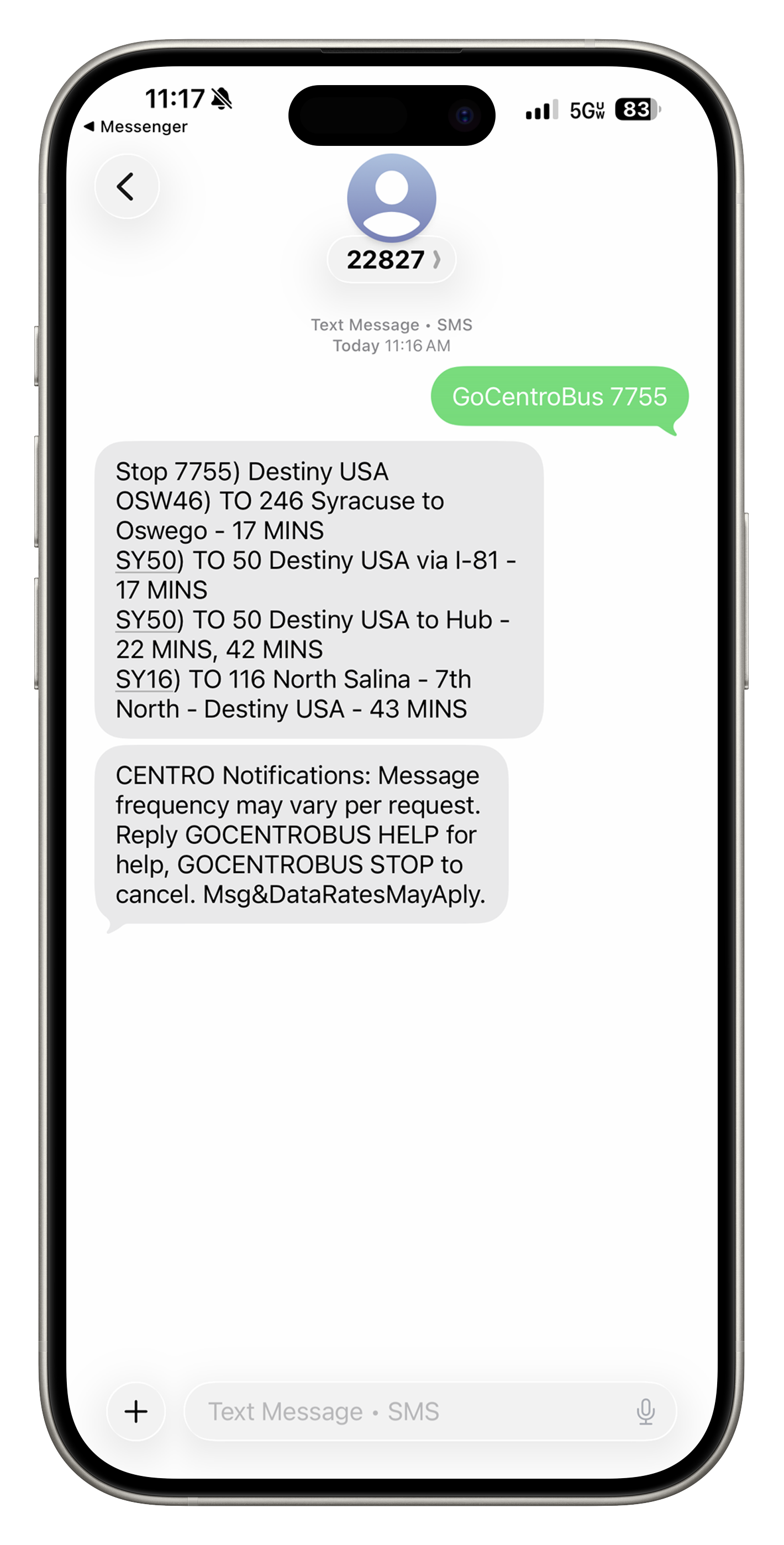
This example response says that, as of 2:06 pm, at stop 7755 (at Destiny USA), Bus Tracker estimates that a #116 N. Salina St - 7th North St bus to Downtown (The Hub) is due to arrive in 26 minutes.
Additional Options
- You can also reply to this message with "S" to get any service alerts that may affect your trip, or "R" to get the latest, most updated result for the same stop.
- If your stop has multiple routes serving it, your results may not fit in one text message. In that case, you can also reply with "N" to see the next result for the stop you requested
If you have subscribed to receive text messages for service alerts or arrivals at scheduled times from the Centro Bus Tracker website, you can always reply with (or send a new text with) "STOP" to unsubscribe.
(Remember: Message and data rates may apply. Check with your mobile carrier first.)
Narrowing Your Results
To get just the routes you're interested in (and potentially reduce the number of texts you need to send or receive to get the information you want), you can also specify a route number in your request. Add sy[#] (with the line number and no space instead of the number sign) to your request.
Example: gocentrobus 7755 sy16 Instead of getting all results for buses predicted to arrive at stop 7755 (Destiny USA), you'll only get results for Sy16 N. Salina St buses.